
The best budget 3D printer for beginners in 2026 is a reliable, easy-to-assemble machine under $300 with auto-bed leveling, stable firmware, and strong community support. Models like the Creality Ender series, Anycubic Kobra Neo, and Bambu Lab A1 Mini lead the entry-level category because they reduce setup complexity and produce consistent prints.
Buying your first 3D printer feels exciting. It also feels confusing. Hundreds of options claim to be beginner-friendly. Many are not.
According to a 2024 Statista additive manufacturing report, the global 3D printing market crossed $20 billion and continues growing fast. That growth created more affordable printers—but also more confusing choices.
This guide explains how to choose the best budget 3D printer step by step. You will learn what features matter, what mistakes beginners make, and which specifications actually improve print quality.
Why Are Budget 3D Printers Popular Among Beginners?
Budget 3D printers are popular because they offer affordable entry into prototyping, hobby design, and small business production without requiring advanced technical skills.
Most beginners want three things:
- Easy setup
- Reliable printing
- Low maintenance costs
Affordable printers now include features that used to exist only in professional machines. Auto-bed leveling. Silent stepper drivers. Direct-drive extruders. Flexible build plates.
A 2023 Ultimaker user survey showed that 67% of new users started with printers under $400 before upgrading later.
This confirms a pattern. Beginners rarely need expensive machines. They need stable machines.
How Much Should Beginners Spend on a Budget 3D Printer?
Most beginners should spend between $150 and $350 for a reliable budget 3D printer in 2026.
This price range balances performance and simplicity. Below $150, printers often lack stability. Above $350, features become unnecessary for first-time users.
| Price Range | What You Get |
|---|---|
| $100–$150 | Basic kits, manual leveling, slower prints |
| $150–$250 | Improved stability, larger community support |
| $250–$350 | Auto leveling, quiet motors, better firmware |
Choosing inside the middle range usually delivers the best beginner experience.
Which Features Matter Most in the Best Budget 3D Printer?
The most important features in a budget 3D printer include auto-bed leveling, print stability, build volume, and firmware compatibility.
Why Is Auto-Bed Leveling Important?
Auto-bed leveling ensures the nozzle maintains the correct distance from the print surface. This improves first-layer adhesion.
First-layer failure causes over 60% of beginner print errors, according to community troubleshooting data from Prusa forums.
How Does Print Stability Affect Output Quality?
Frame rigidity reduces vibration and improves accuracy. Metal frames perform better than acrylic structures.
Stable printers produce smoother edges and fewer layer shifts.
What Build Volume Should Beginners Choose?
A build volume of at least 220 × 220 × 250 mm is ideal for most beginners.
This size supports:
- Prototype models
- Replacement parts
- Educational projects
- Home accessories
Why Does Firmware Compatibility Matter?
Open-source firmware like Marlin allows upgrades and troubleshooting.
Closed firmware systems limit customization.
What Types of Budget 3D Printers Are Best for Beginners?
FDM printers are the best budget 3D printers for beginners because they are affordable, easy to maintain, and safe for home use.
There are two main types:
Are Cartesian 3D Printers Beginner-Friendly?
Yes. Cartesian printers are the easiest to assemble and repair.
Examples include:
- Creality Ender series
- Anycubic Mega series
- Elegoo Neptune lineup
Should Beginners Choose Resin 3D Printers?
Resin printers produce higher detail but require ventilation and chemical handling.
They are better suited for miniatures and jewelry.
Most beginners should start with filament-based printers first.
Which Filament Types Work Best with Budget 3D Printers?
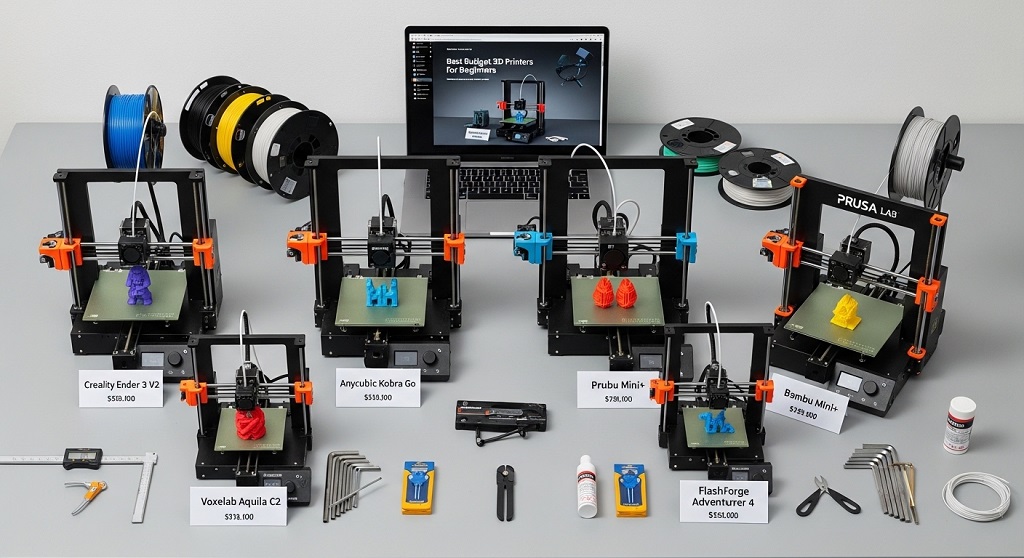
PLA filament works best with budget 3D printers because it prints at lower temperatures and produces fewer failures.
Common beginner filament choices include:
- PLA – easiest to print
- PETG – stronger than PLA
- TPU – flexible material for advanced users
PLA remains the recommended starting material for learning calibration basics.
How Easy Is It to Set Up a Budget 3D Printer?
Most modern budget 3D printers take 20 to 60 minutes to assemble.
Earlier printers required full-frame assembly. Newer printers arrive partially prebuilt.
A 2025 MakerSurvey report showed that printers with preassembled gantry structures reduced setup errors by 45%.
Look for printers that include:
- Pre-wired electronics
- Auto calibration
- Touchscreen interface
- Guided setup instructions
What Print Quality Can You Expect from Budget 3D Printers?
Budget 3D printers can produce layer resolutions between 0.1 mm and 0.3 mm, which is sufficient for functional prototypes and hobby prints.
Print quality depends more on calibration than price.
Key factors affecting output include:
- Nozzle alignment
- Bed temperature
- Layer height
- Print speed
Proper tuning often improves results more than hardware upgrades.
Are Budget 3D Printers Reliable for Small Businesses?
Yes. Many small businesses use budget 3D printers for prototyping, custom accessories, and low-volume product runs.
A 2024 Etsy seller study found that 38% of handmade product sellers used entry-level 3D printers to produce inventory.
Popular business uses include:
- Custom phone stands
- Keychains
- Desk organizers
- Educational kits
Consistency matters more than speed for these applications.
What Safety Features Should Beginners Look For?
The best budget 3D printer should include thermal runaway protection and enclosed wiring.
Essential safety features:
- Power loss recovery
- Thermal shutdown protection
- Stable power supply
- Silent motherboard cooling
These features reduce hardware damage risks.
Which Mistakes Should Beginners Avoid When Buying a Budget 3D Printer?
The biggest beginner mistake is choosing based only on price instead of reliability.
Common mistakes include:
- Ignoring community support availability
- Buying printers without auto leveling
- Choosing unsupported filament types early
- Skipping spare parts availability checks
Strong community forums often solve setup problems faster than manuals.
How Does Community Support Improve the Beginner Experience?
Community support reduces troubleshooting time and improves printing success rates.
Printers with large user bases provide:
- Free calibration profiles
- Firmware updates
- Repair tutorials
- Upgrade guides
Open ecosystems shorten the learning curve significantly.
What Are the Best Budget 3D Printer Models to Consider in 2026?
Top beginner-friendly budget printers in 2026 include Creality Ender 3 V3 SE, Anycubic Kobra Neo 2, and Bambu Lab A1 Mini.
| Printer | Key Advantage |
|---|---|
| Ender 3 V3 SE | Auto leveling and stable frame |
| Kobra Neo 2 | Fast setup process |
| A1 Mini | Smart calibration features |
Each model balances affordability and performance.
How Can Beginners Maintain Their Budget 3D Printer?
Regular maintenance improves printer lifespan and output accuracy.
Essential maintenance steps include:
- Cleaning build plate weekly
- Tightening belts monthly
- Checking nozzle condition
- Updating firmware
Simple maintenance prevents most printing errors.
Conclusion: How Do You Choose the Right Budget 3D Printer Today?
Choosing the best budget 3D printer in 2026 means focusing on reliability, ease of setup, and upgrade potential instead of chasing the lowest price.
A beginner-friendly printer should include auto-bed leveling, stable firmware, and strong community support. These features reduce frustration and increase printing success from day one.
If you plan to build prototypes, start a small Etsy product line, or explore creative modeling, a well-chosen entry-level printer can support your goals for years.
Start by selecting a printer in the $200–$300 range with open firmware compatibility and PLA support. Then practice calibration early.
Ready to begin your 3D printing journey? Choose a trusted beginner printer today and start creating your first functional design within hours.
FAQs About the Best Budget 3D Printer
What is the easiest budget 3D printer for beginners?
The easiest beginner printer includes auto-bed leveling and guided setup features such as the Ender 3 V3 SE or Bambu Lab A1 Mini.
Can a budget 3D printer print professional-quality models?
Yes. With proper calibration, budget printers produce accurate prototypes suitable for hobby and small business use.
Is a resin printer better than an FDM printer for beginners?
No. Resin printers require chemical handling and ventilation. FDM printers are safer and easier to maintain.
How long does a budget 3D printer last?
Most entry-level printers last 3–5 years with proper maintenance.
Do budget 3D printers require constant upgrades?
No. Upgrades are optional but can improve speed and reliability over time.
What software do beginners use for 3D printing?
Popular beginner slicing software includes Cura, PrusaSlicer, and Bambu Studio.
Read More Also: How to Reduce Neck Pain While Sleeping on Your Back
Discover More: How to Pick Travel Sunglasses for Men That Last Long